Features
From the first tee to the final awards ceremony, REN GOLF's industry-leading technology helps you master every piece of data.
🚀 Quick Start: Five-Stage Practical Guide
REN GOLF isn't just a scoring tool — it's your digital caddie. Follow these steps to begin your professional golf digital experience.
Choose Your Login Method
We provide the most seamless login experience without tedious registration or profile setup:
- Social Login: We strongly recommend signing in with Google or Apple. Your account is linked automatically to save your data permanently, and you can start using it immediately without entering any name.
- Guest Login: If you just want a quick trial, choose Guest mode. You only need to enter a simple "Nickname" for display on the Live Board.
Start Your First Round
Tap the "+" button at the bottom of the main screen:
- Course Search: Enter part of the course name, and the system auto-fills the correct par configuration.
- Date Setting: Precisely record the round date for multi-dimensional analysis later.
Invite Friends for Collaborative Scoring
No need for everyone to keep separate records! Tap the "Invite" button within the round:
- QR Code Scan: Friends simply scan to join the same scorecard.
- Permission Sharing: Every stroke entered syncs in real-time to all group members, completely eliminating data asymmetry.
- Identity Binding & Score Transfer: The scorer taps a player's name on the scorecard, scans their personal QR Code, and the record is bound and synced to their account.
Multiple Scoring Methods
Flexibly switch between methods for any scenario:
- Manual Input: The most direct approach, with simple/detailed (including putts) toggle.
- AI OCR Recognition: For hands-free scoring, simply photograph the paper scorecard for instant conversion.
Analyze Data & Share
After the round, the system automatically generates:
- Real-Time Heatmap: See if your strength lies in driving or short game.
- Live Board Rankings: For team events, instantly see your ranking among all players.
📸 AI OCR Smart Recognition
This is REN GOLF's most acclaimed technology — bid farewell to tedious manual input.
Automatic Optimization Pipeline
After you take a photo, our backend engine performs:
- Adaptive Brightness Compensation: Automatically boosts exposure in darker environments to preserve digit details.
- Multimodal Logic Recognition: Recognizes not just numbers but also analyzes table structure.
- Error Validation: Cross-references the global course knowledge base to auto-correct potential visual errors.
Dual Recognition Modes
REN GOLF offers two AI recognition modes, switchable in Settings:
AI Recognition
- Supports printed + handwritten recognition
- AI course search capability
- Multimodal visual analysis, higher accuracy
High-Speed AI
- Supports printed text only
- Faster inference speed
- No handwriting recognition or AI course search
🔍 Course Search System
REN GOLF provides a "Local + Cloud" hybrid course database, letting you quickly find course data no matter where you play.
Smart Search
When creating a new round, enter partial course name (Chinese or English). The system filters and displays matches in real-time:
- Local Database: Previously used courses are auto-saved on your device for fastest search.
- Cloud Database: Community-contributed course data. Marked with a Cloud tag — one-tap download to local.
- Downloaded: Previously downloaded cloud courses marked with a Downloaded tag.
Review System
To ensure course data accuracy, every cloud course has a review status:
- ✅ Reviewed: Verified by administrators — Par and HDCP configurations are confirmed correct.
- ⚠️ Unreviewed: Newly uploaded by community members. The system warns of risk and suggests verifying against the paper scorecard on-site.
📊 Personal Shot Data Analysis
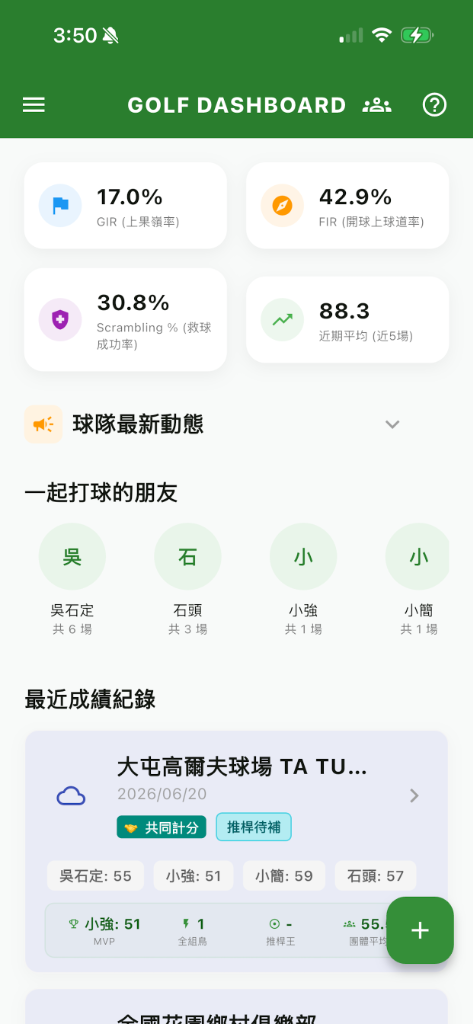
REN GOLF provides a personalized data dashboard that transforms your past rounds into objective statistical metrics, allowing you to review your performance and consistency at any time.
Data Dashboard
Automatically aggregates your recent scores and advanced metrics for at-a-glance performance tracking:
- Greens in Regulation (GIR): Tracks the percentage of holes where you hit the green in regulation, measuring iron accuracy.
- Fairways in Regulation (FIR): Tracks your driving accuracy by measuring how often your tee shots hit the fairway.
- Scrambling %: The percentage of time you miss the GIR but still make Par or better, reflecting your up-and-down recovery skills.
- Recent Average (Last 5): Dynamically calculates your average gross score over your last 5 rounds to show your current true form.
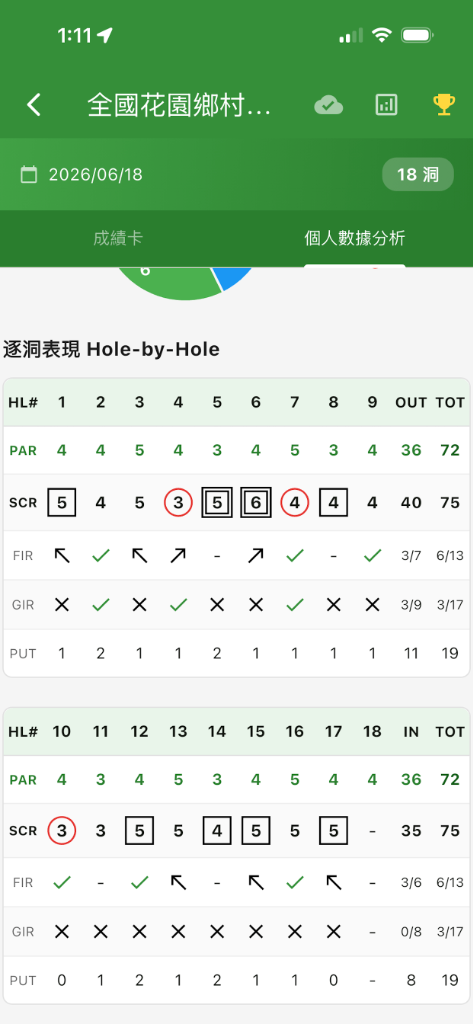
Hole-by-Hole & Advanced Stats
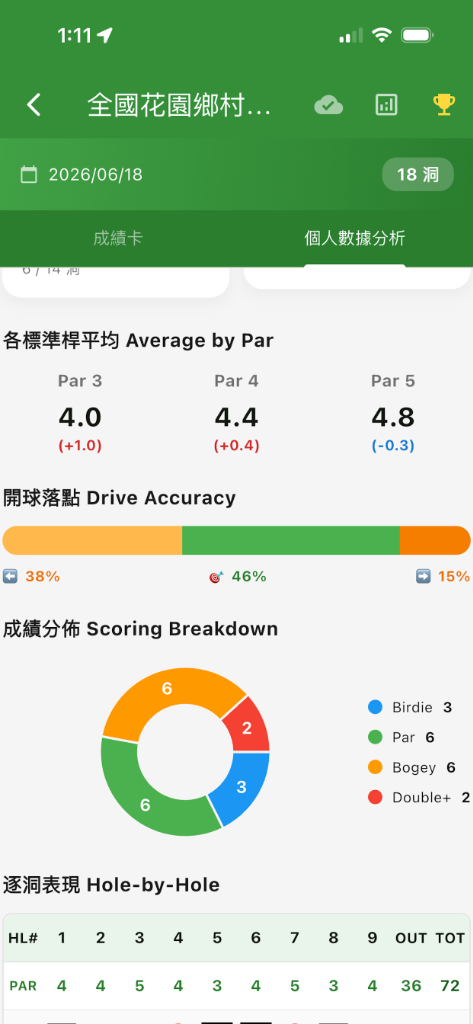
If "Advanced Mode" is enabled during scoring (recording putts, fairways, etc.), the system unlocks deeper metrics:
- Average Putts: Calculates the total putts per round, reflecting consistency on the greens.
- Greens in Regulation (GIR): The percentage of holes where the green was reached in regulation strokes.
- Fairways in Regulation (FIR): The percentage of tee shots that land on the fairway.
- Scrambling: The percentage of time a player misses the green in regulation, but still makes par or better. Reflects recovery skills.
- Scoring Distribution: A historical breakdown of Birdies, Pars, Bogeys, and Double Bogeys.
Match Records & Honor Wall
Visualizes every past round and award achieved:
- Historical Round List: Lists all rounds in reverse chronological order. Tap any round to view the original scorecard.
- Honor Wall: Automatically logs placements and special awards won in team tournaments (displayed as distinct colored medals).
🎮 Game Formats Encyclopedia: Rules & Strategy Deep Dive
REN GOLF is dedicated to digitizing complex competitive formats. Here are the core algorithms and strategic guides used by top golfers.
Match Play
The purest test of consistency. Each hole has an independent outcome — it's not about total strokes, but holes won. The system supports three modes:
Head-to-head, hole by hole. Winner gets 1 point per hole, tie is AS (All Square).
Each plays own ball; best score in team represents that side. Strategy lies in risk allocation between teammates.
2v2 alternate shot. Teamwork and chemistry are key.
With "Handicap" enabled, the system distributes strokes on specific holes based on handicap differential. Allocation follows the Pairwise Handicap formula, ensuring fair competition between amateurs and low-handicap players.
💡 Settlement Format: The system generates professional Match Play terminology. E.g., "A wins 3 & 2" means A leads by 3 holes with 2 remaining. → View Full Rules
Las Vegas
The most dramatic game in the system, supporting three core computation modes:
The classic mode — arrange strokes by value and concatenate (4,5 → 45). A 10-stroke score triggers the "10-stroke lock" explosion mechanism.
For different stake levels, supports direct addition (4+5=9) or multiplication (4×5=20) as the base score.
If your opponent makes a Birdie while your entire team doesn't, the system forcefully reverses your score (e.g., 46 becomes 64), instantly putting the leader under massive pressure.
💡 Technical Note: Built-in "Multiplier Queue" — if a hole ties, points automatically roll to the next hole at 2x, even 3x, until a winner emerges. → View Full Rules
Consecutive Tie Multiplier: The 2-3-3-2 Rule
To enhance competitive excitement and post-tie explosive points, we designed the professional "2-3-3-2" tiered multiplier accumulation system:
• 1st Tie: Next hole points become 2x.
• 2nd Tie: Multiplier upgrades and accumulates, next hole becomes 3x.
• 3rd Tie: Multiplier caps and generates a sequence — subsequent two holes execute 3x, 2x in order.
• Final Sequence: Consecutive ties form a 2 → 3 → 3 → 2 dramatic multiplier path.
💡 Winner Clearance Mechanism: Once a winner emerges, they must play through all "accumulated multiplier holes" to clear the debt. This means one reversal after a tie could carry away double or even triple the points!
Dou Dizhu
The classic 3-player game, faithfully recreating the "Landlord vs. Peasants" rules:
- Landlord Selection: The player hitting 2nd (Index 1) per hole is automatically chosen as "Landlord" to face the other two "Peasants."
- Average Comparison: Landlord's strokes vs. average of both Peasants. Landlord wins = +2 points, loses = -2 points.
- Dynamic Honors: System adjusts next-hole tee order in real-time based on performance, ensuring the Landlord role keeps rotating.
Cut-Throat
Supports 3-Ball or 4-Ball individual competition — the ultimate test of all-around skill:
- Round Robin Match Play: Each player simultaneously conducts independent 1v1 match play against all others.
- Special Achievements: Additional rewards are configured for Birdie, Eagle, Hole-in-One, etc.
- Cross Handicap: Supports Pairwise handicap calculation, ensuring amateurs and pros compete fairly on the same scorecard.
Bonus Rewards & The "Offset" Truth
REN GOLF's exclusive bonus algorithm ensures competition stays rooted in skill:
If you make a Birdie (Birdie x2) and your opponent also makes a Birdie (Birdie x2), the system first executes "skill offset." Both sides' bonuses cancel out, returning to a tie, rather than inflating both scores. This prevents betting points from diverging from actual performance.
- Multiplier Mode: Birdie x2 / Eagle x5 / HIO x10 — for those seeking peak moments of excitement.
- Fixed Points Mode: Birdie +2 / Eagle +4 / HIO +8 — keeps rewards linear for clearer post-round statistics.
Game Center Dashboard
When running multiple game formats simultaneously (e.g., Las Vegas + Match Play), Game Center automatically consolidates all game data into a unified settlement view.
- Global Settlement Summary: Auto-aggregates cumulative points and estimated amounts across all formats — see the biggest winner at a glance.
- Trend Line Charts: Hole-by-hole point trends for each format, displayed in different colored lines for quick tactical insight.
- Detailed Settlement Table: Lists each game's type, unit amount, and all players' point distributions.
- Quick Switch: Use the top tab bar to toggle between "Overview" and individual game formats.
⌚ Smartwatch Integration (Wear OS / Apple Watch)
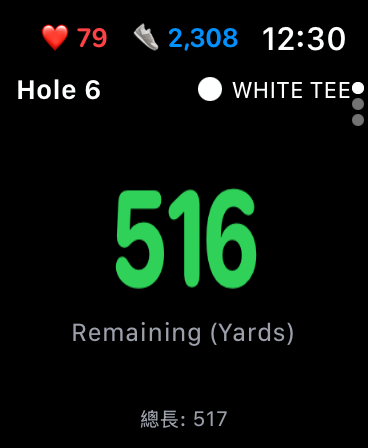
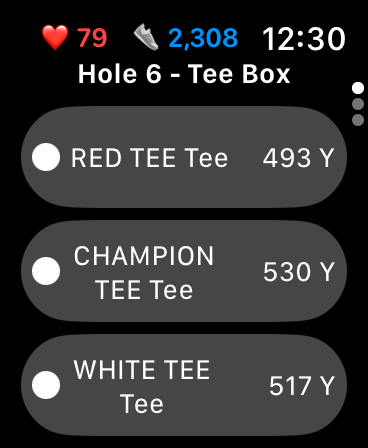
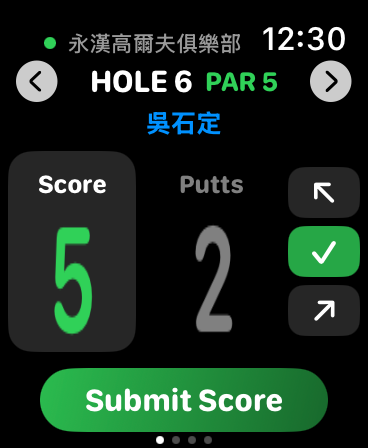
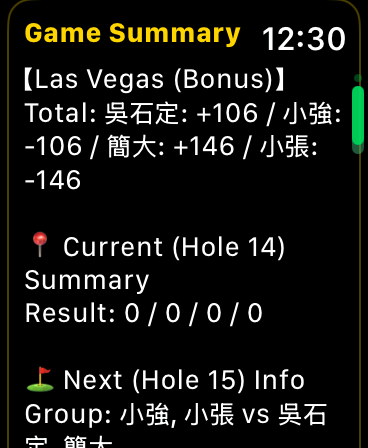
Introducing Smartwatch Companion in REN GOLF 2.0. Keep your phone in your bag and enjoy a seamless, hands-free golfing experience directly from your wrist.
Real-time GPS Distances
View the remaining yards to the green and the total hole length. You can easily switch your Tee Box directly on the watch, and the distances will automatically recalculate.
Wrist-based Scoring
Quickly input your total Score and Putts for the hole and submit directly from your smartwatch. Data synchronizes instantly with your phone.
Live Game Summary
Check the live Game Summary on your wrist, such as Las Vegas points, current team standings, and upcoming group assignments for the next hole.
🏆 Team Operations Complete Guide: From Setup to Awards
For large teams of dozens or even hundreds of players, REN GOLF provides a complete digital operations center. Here's the essential in-depth guide for administrators and members.
Sidebar Navigation & Mode Switching
Tap the top-left menu to open the team navigation bar — this is your team's command center:
- Dual Mode Switch: Toggle between "Personal Mode" and "Team Mode" anytime. The system auto-isolates data, ensuring team scores don't mix with personal practice.
- Dynamic Badge Notifications: When new member applications arrive, bulletin board updates, or active tournaments exist, the menu shows real-time red dot alerts.
- Team Switcher: If you manage multiple teams, switch via dropdown — data auto-calibrates seamlessly.
Permission Weights & Role Settings
Managing an efficient team requires clear hierarchy and division of labor:
- Auto Role Recognition: Built-in permission weights. Members set as President > Secretary General > Team Manager receive highest admin privileges and are pinned to the top of the member list.
- Dynamic Title Assignment: Managers can assign custom titles (e.g., Treasurer, Marshal) at any time, giving the team structure and digital ceremony.
- Secure Data Handover: Built-in role transfer mechanism and one-click removal, ensuring digital tournament assets remain secure during personnel changes.
Cloud Handicap & Data Isolation
On tournament day, administrators only need to focus on the schedule — the system handles the rest:
- Name Verification: The system uses "Name" as the unique identifier to precisely route round data to the team database.
- Auto Handicap Sync: Automatically reads members' historical average handicaps and applies the handicap formula when creating tournament groups.
- Auto-Sync Mechanism: When administrators enter the management page, the system automatically initiates cloud-local data calibration in the background, ensuring zero-lag scoring.
Modified Callaway / Callaway (Peoria System)
The most commonly used fair ranking system for team tournaments. Built-in two blind-hole calculation modes:
Fully random selection of 12 hidden holes from the entire course. No distinction between front/back nine or Par values — completely random. Suited for teams wanting more luck factor.
Uses Par-based exclusion: Randomly excludes 2 holes each from Par 3/4/5, leaving 12 hidden holes. Ensures representation across hole types.
HDCP = (Hidden Hole Strokes Total × 1.5 − Total Course Par) × 0.8
Net Score = Gross Score − HDCP
※ Per-hole cap: Double Par (prevents single-hole blowups from skewing handicap).
💡 Administrators can choose "Auto Draw" or pre-designate hidden holes when creating tournaments. The system also supports "Gross Score Ranking" mode — ranking by raw scores without HDCP calculation.
Annual Summary Report & PDF Export
A team's season results deserve formal documentation. The annual summary provides administrators with:
- Cross-Tournament Summary Table: Members as rows, tournaments as columns — displaying all scores, handicaps, and rankings for the entire year at once.
- Year Selector: Switch between years to view historical summaries.
- Dues Management: Toggle each member's "Paid / Unpaid" status directly in the table.
- Manual Handicap Correction: Administrators can manually edit individual members' actual handicap values.
- One-Click PDF Export: Tap the print icon for a structured PDF document, ready to print or share to the team chat.
Player Profile & Honor Wall
In Team Mode, tap any teammate's name to enter their personal data page with three tabs:
Rounds played, average score, and best record at a glance. Only counts fully completed 18-hole rounds.
Medal matrix displaying all awards: Longest Drive, CTP, BB Award, Birdie Award, etc. Gold/Silver/Bronze frames for 1st/2nd/3rd place.
Lists all participated rounds in reverse chronological order. Tap to jump directly to the full scorecard.
💡 Administrators can manually add custom awards for teammates (e.g., "Big Wave Award") and associate them with specific tournaments.
Big Screen Live Board & Ceremony Mode
This is REN GOLF's feature designed specifically for awards dinners:
Project the Live Board URL at the tournament venue — every player's hole-by-hole progress updates in real-time on the big screen via the cloud.
Before the last group finishes, administrators activate this mode. All rankings on players' phones become "frozen" and hidden, maintaining the mystery of final standings.
💡 Pro Tip: At the climax of the dinner, the administrator presses "Announce Results" from the backend — all members' phones simultaneously burst with tournament celebration animations, creating an unforgettable awards moment.
⚙️ System Settings Overview
Access "Settings" from the side menu to manage your account, engine preferences, and storage space.
Personal Profile Management
- Nickname / Name Editing: Tap the edit icon in the top right to modify your display name anytime.
- QR Identity Code: Long-press in the profile area to summon your personal QR Code. When scanned, the system automatically binds paper scorecard records to your digital account.
- Guest to Member: After signing in with Google/Apple, the system auto-detects local guest-period history and offers a "Transfer" or "Discard" dialog.
Interface Language
- Interface Language: Supports five languages — Traditional Chinese, Simplified Chinese, English, Japanese, Korean. Changes take effect immediately.
- Follow System: Default is "Follow System Language," auto-detecting your device's language setting.
Cache Management & Storage Scan
- One-Click Cache Clear: Tap "Clear Cache" to clean temporary scan images from the AI recognition process, freeing device space. Displays current cache size.
- Deep Storage Scan: Long-press the cache section for 3 seconds to trigger a complete storage diagnostic report with detailed directory breakdown.
💎 Subscription Plans
REN GOLF offers flexible service plans for individual players and team managers to meet various tracking and management needs.
Free Plan
Suitable for everyday round tracking. Includes full scoring, AI recognition, basic game formats, and personal data analysis. Includes ads.
- Basic scoring & AI recognition
- Ad-Free ❌
- Cloud Backup Sync ❌
Lite Plan
Designed for players seeking a pure experience. Removes all ad interruptions for smooth operation and scoring.
- All features from Free Plan
- Ad-Free ✅
- Cloud Backup Sync ❌
Pro Plan
Built for heavy golf enthusiasts. Not only removes ads but also unlocks global cloud synchronization for seamless cross-device access to all your records.
- All features from Lite Plan
- Ad-Free ✅
- Cloud Backup Sync ✅
Team Subscription
Designed for team managers. Unlocks complete team administrative features with multiple tiers (12 / 24 / 36 members) based on team size.
- Live Board for tournaments
- Automated scoring & handicap calculation
- Member list & historical report management
📬 Contact & Feedback
Having issues or improvement suggestions? Reach our technical team through:
📧 Support: support@ren4golf.com
We commit to responding within 48 hours (excluding weekends and holidays). When reporting issues, please include your device model and steps to reproduce for faster resolution.