👇 Try the Team Features Now 👇
*Click to expand the team interface below and preview all features as a guest
Why do small teams need a management system?

Golf is just an excuse; getting together is the main event.
For amateur teams of 10 to 20 people, it's all about bonding and camaraderie. What golfers look forward to in every regular tournament is swinging the club together, dining afterward, and teasing each other about their scores—this is the real point.
However, making all this happen falls on a role nobody wants: The Secretary General.
Booking the course, confirming attendance one by one, organizing groups on-site, collecting scorecards, calculating rankings, settling finances, sending reports... Before and after every regular match, all these trivial tasks fall on one person. While golfers relax on the course, the Secretary General chases people in group chats; while golfers sit down for the post-match dinner, the Secretary General goes home to open Excel.
Over time, this position has gone from "passionate service" to a "hot potato everyone avoids." Nobody wants to take it on, and nobody dares to push for it—because everyone knows deep down: Without the Secretary General, the team will disband.
REN GOLF was created specifically for this purpose. A free app designed for amateur small teams, integrating event registration, grouping, scoring, ranking, and finances entirely into your phone—allowing the Secretary General to finish their day's work as soon as they finish playing.
A Regular Match: The Invisible Workload of the Secretary General
Attendance confirmation, roster organization, manual grouping, on-site check-in, score collection, handicap calculation, ranking verification, hosting the awards—these are tasks golfers don't see, yet they are the real reason every regular match runs smoothly.
Traditionally, the Secretary General spends hours before the match asking for attendance in groups, manually organizing spreadsheets, and printing lists to bring to the course. The golfer's experience is: waiting to be called for a group, writing scores by hand, not knowing the ranking after the match, and the awards ceremony just being a name read off a piece of paper.
REN GOLF Team Management System rebuilds this workflow from the ground up. The administrative workload of the Secretary General is significantly reduced, and the golfer's tournament experience is completely transformed—from registration to the reveal of rankings, every step is well-designed.
🛠️ Manager's Perspective: Administrative Efficiency Greatly Improved

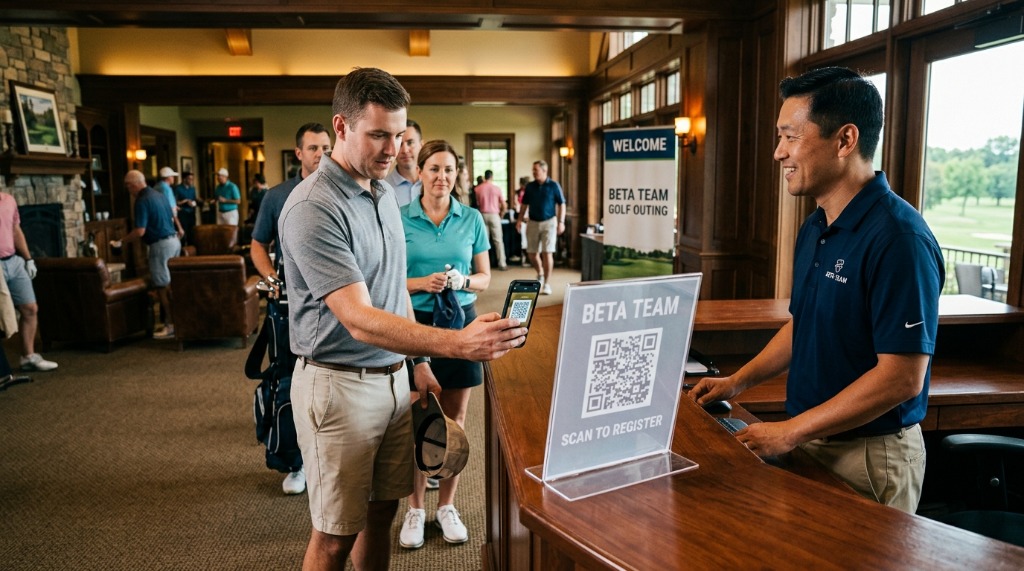
The preparation process for a regular match, comparing the traditional method with REN GOLF:
| Process | Traditional Method | REN GOLF |
|---|---|---|
| Attendance | Asking in chat groups, tagging unresponsive members individually | Members register directly in the App, admins see attendance numbers instantly |
| Grouping | Manual Excel layout, screenshot sent to group | One-tap random grouping, supports drag-and-drop adjustments, auto-updates for all upon completion |
| Check-in | Printed list, checking off names manually | Members check in themselves; supports "Prioritize checked-in members for grouping" |
| Score Collection | Groups send back cards after playing; easily misplaced | Real-time sync across groups; multiple simultaneous inputs won't overwrite |
| Handicap Calculation | Manual or Excel formulas; prone to errors | Auto-applies New Peoria / New New Peoria formulas; random draw for hidden holes on-site |
| Awards | Reading names aloud; chaotic scene | Ceremony Mode freezes rankings, revealing them one by one, synchronized across everyone's phones |
⏱️ From "Attendance Confirmation" to "Grouping Complete," it takes at most 15 minutes. The Secretary General can finally focus on playing golf on the course.
⛳ Golfer's Perspective: A Sense of Participation in Every Step
The golfer's experience in the App is not just about scoring—it's a complete ritual from registration to the awards ceremony:
📅 Pre-match
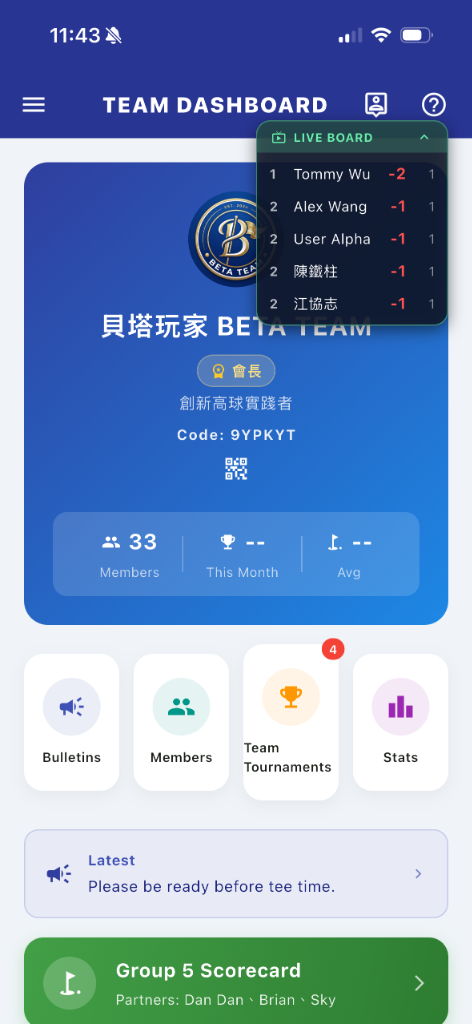
After confirming registration in the App, a green shortcut card automatically appears on the homepage showing the group and companions. Tap it to enter the scorecard directly without waiting to be called.
🏌️ In-match
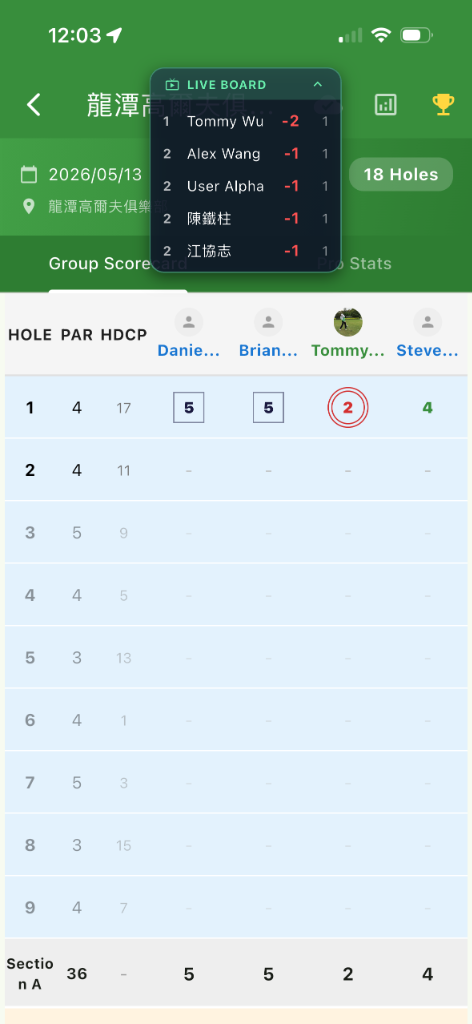
Anyone entering a score on any hole makes it instantly visible to the whole group. The Live Board casts to the course's large screen, making everyone's progress clear at a glance.
🎉 Awards
Under Ceremony Mode, the ranking is frozen and hidden. Revealed one by one in sync with the awards rhythm, the results pop up simultaneously on everyone's phones, transforming the atmosphere.
📈 Long-term
The personal page accumulates all historical scores, handicap trends, and medals earned, creating a personalized digital golf resume.
🎉 Ceremony Mode Live Interface
From automatic hidden hole drawing to various technical awards, bring a true sense of ritual to every post-match dinner:
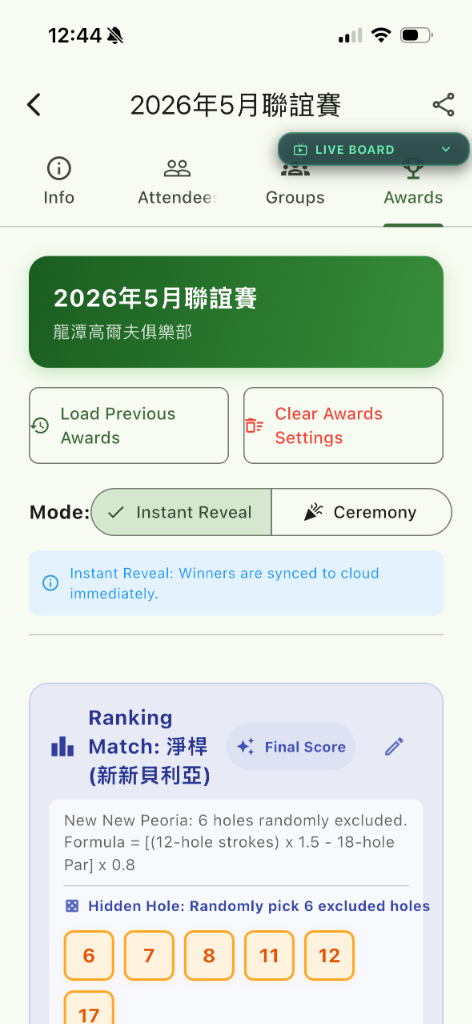
New New Peoria: Auto Draw
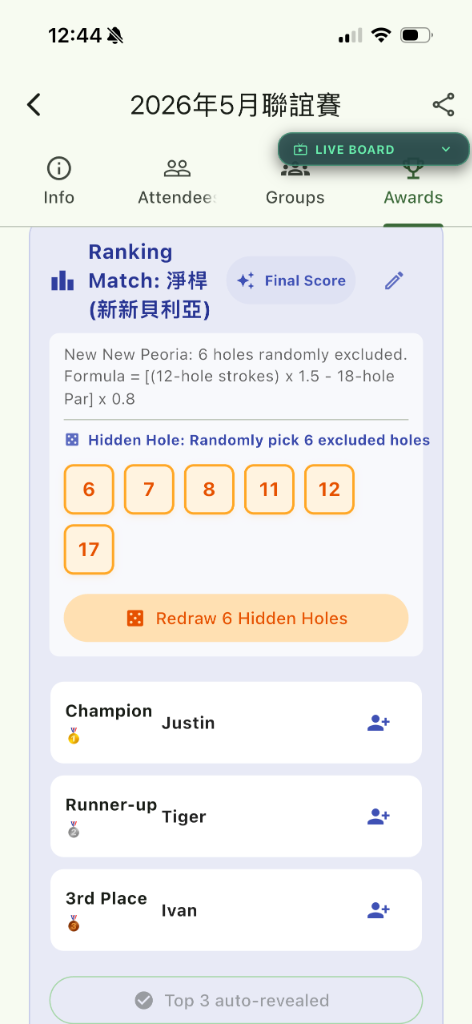
Net Ranking (Manual Reveal)
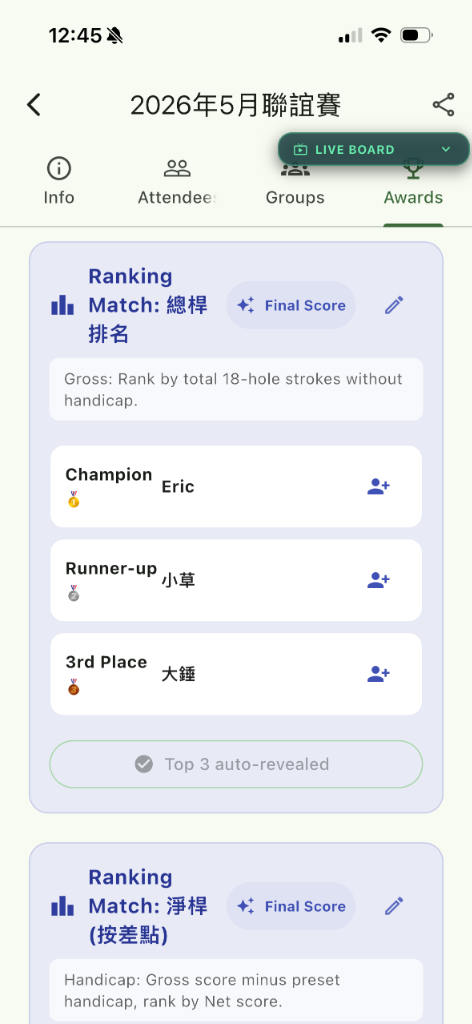
Gross Ranking Auto-Calculated
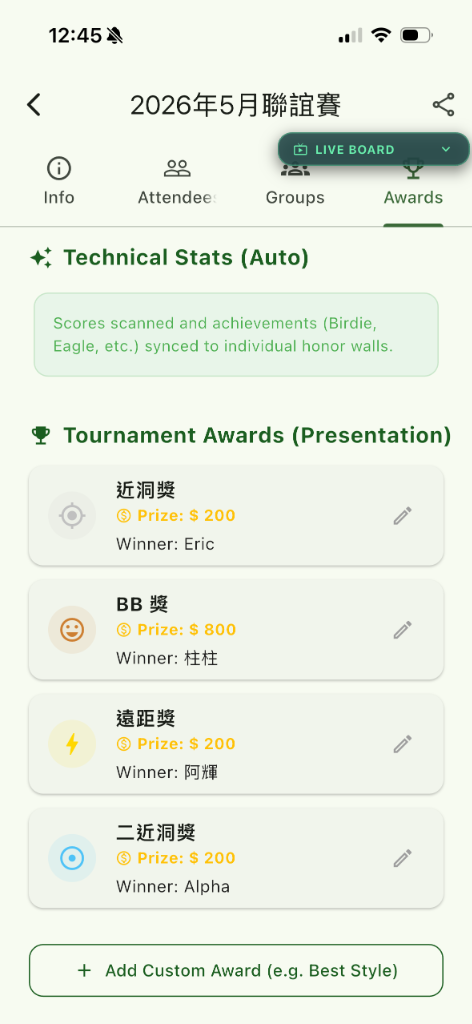
Technical Stats & Custom Awards
💰 Cost-Effectiveness: Start for Free, Upgrade on Demand
REN GOLF offers four plans, allowing you to experience full team features even on the free plan:
| Plan | Member Limit | Best For |
|---|---|---|
| Free | 4 | Small groups, first-time experience |
| Team Lite | 12 | Regular small teams |
| Team Std | 24 | Standard team tournament sizes |
| Team Flagship | 36 | Large teams / Multi-session tournaments |
💡 The monthly fee shared per member is far less than a convenience store coffee—yet it replaces: an Excel management workflow, a scoring app, a bulletin group chat, and the hours of administrative time the Secretary General saves every match.
🏗️ Create & Join Teams
Any logged-in user can create a team. Upon creation, you automatically become the President (Administrator) of the team, holding all management permissions.
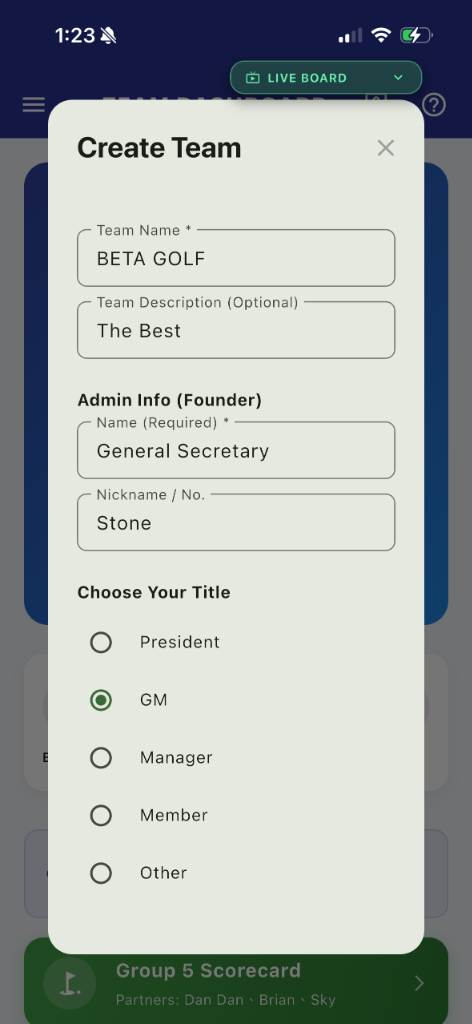
🔑 Exclusive 6-Digit Invite Code Technology
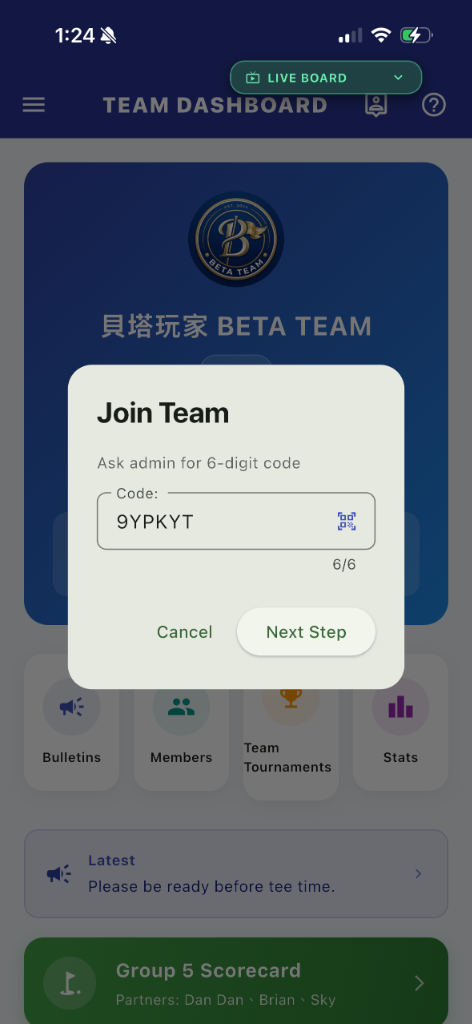
When you create a team, the system automatically generates a 6-digit alphanumeric Invite Code. To prevent visual confusion, we automatically exclude ambiguous characters like I, O, 0, and 1.
- Creation: Switch to Team Mode → Tap "Create New Team" → Enter Name and Description → Get your unique 6-digit code.
- Joining: Members simply enter this 6-digit code to send a join request, waiting for admin approval.
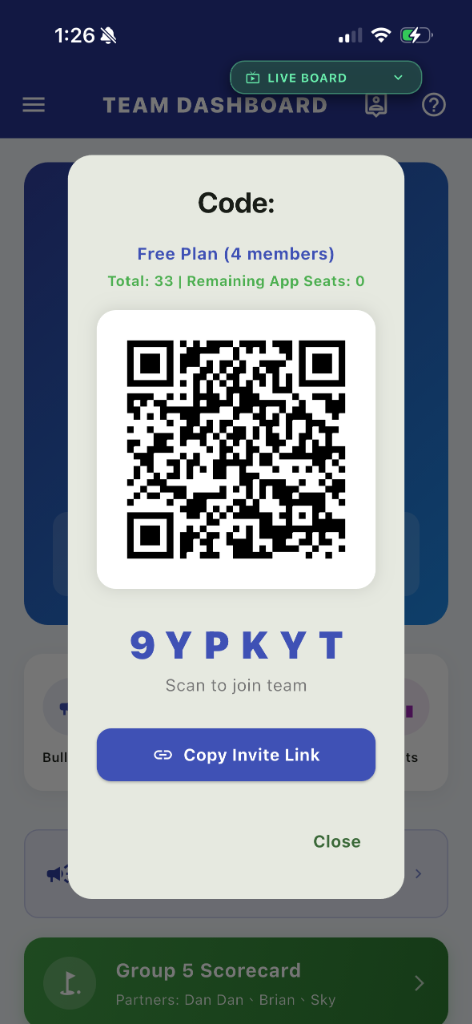
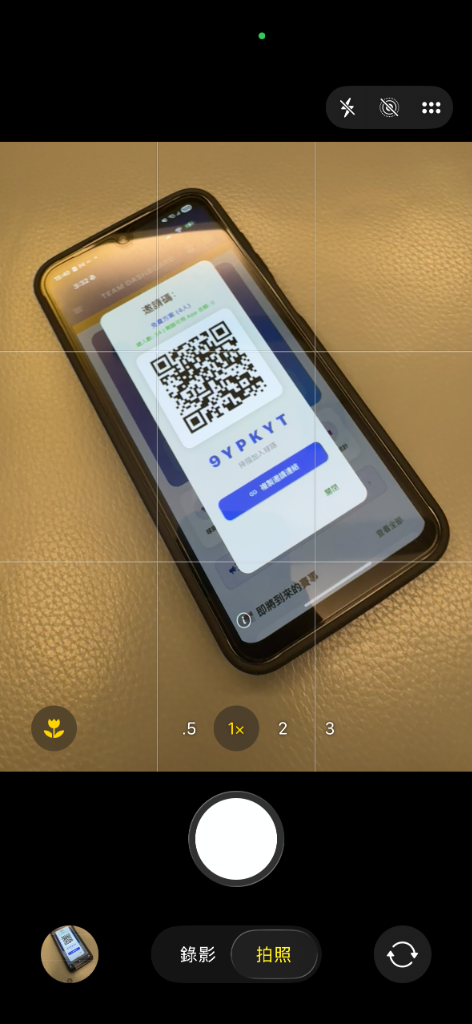
- Quick Join: Admins can share a built-in QR Code or an exclusive invite link. Scanning the code automatically opens the app and fills in the invite code.
📝 You can join multiple teams simultaneously. Tap "TEAM DASHBOARD" on the top header to quickly switch the currently displayed team from the bottom menu.
📊 Exploring the Team Dashboard
Upon entering a team, the homepage consists of six functional areas from top to bottom:
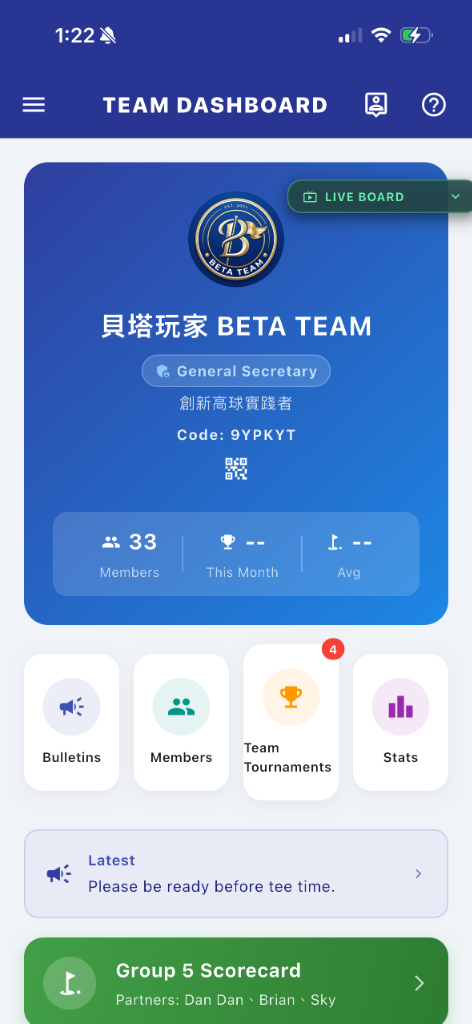
① Team Info Card
The dark gradient card at the top is the team's "front door," featuring the team logo, role badge, invite code, and a stats bar.
- Team Logo: Admins, Presidents, or Secretary Generals can long-press the Logo for 3 seconds to enter the upload process, supporting interactive circular crop previews before saving to the cloud.
- Role Badge: Displays your title in different colors. 🥇 Gold = President / Secretary General; 🔵 Blue = Administrator; ⚪ White = Custom Title.
- Invite Code + QR Code: Tap the QR Code icon to open the invite dialog (see next section).
- Stats Bar: Quickly displays the total member count, this month's tournaments, and the team's average score.
② Quick Actions (4 Cards)
The middle of the homepage provides four white cards, serving as one-tap entries to the most used features. Some features are restricted for free teams (4 members), prompting an upgrade when tapped.
📢 Bulletin
View and publish team announcements. A red dot appears when there are unread announcements.
👥 Members
Manage the member roster and approve join requests. Admins see pending counts (red numbers).
🏆 Tournaments
View and manage all team tournaments. Displays a red number when there are active matches.
📊 Statistics
View an overview of team data, including historical scores and handicap distributions.
③ My Group Shortcut (Pre-match Only)
When you have registered for a regular match and the admin has completed grouping, a green card will automatically appear on the homepage, displaying your group number and teammates. Tap it to go straight to the scorecard without navigating through the tournament pages. This card disappears automatically once the match ends or grouping is canceled.
④ Latest Announcement Preview
The homepage instantly displays a summary of the most recent announcement; tap to view the full content in the bulletin. Pinned announcements will show a "Pinned" tag next to the summary.
⑤ Upcoming Tournaments
Sorted by date, displays up to 2 recent tournaments with status "Registration Open / Locked / In Progress". Each card contains the date, name, course, and status tag; tap to enter details, or tap "View All" to jump to the tournament list.
⑥ Recent Results
Displays the last 2 completed tournaments (newest first). Tap to view rankings and score details.
🔔 Invite Golfers — QR Code Dialog
Tap the QR Code icon on the Team Info Card to pop up the invite dialog:
- Current Plan: Free (4) / Team Lite (12) / Team Std (24) / Team Flagship (36)
- Quota Status: Approved count vs. Remaining App quota (warns in red when exceeded)
- Large QR Code: Scans automatically direct to the join process.
- Invite Code Text: Displayed in large, bold font for easy verbal communication.
- Copy Invite Link: One-tap copy to clipboard, easily pasted into WhatsApp/LINE or other messaging apps.
📝 When an invitee clicks the link, the system routes them to the app store (if uninstalled) or directly opens the App to the join process (if installed).
👥 Member Management Admin Only
Digitalization of a team is more than just a list; it's about precise permission management. Admins can perform the following on the member management page:
| Action | Description |
|---|---|
| ✅ Approve Requests | Approve or reject join requests. When pending, the "Members" card on the homepage shows a red number. |
| 🏷️ Assign Titles | Set custom titles (e.g., "Secretary General", "CFO") for members, which display on leaderboards. |
| 🔑 Set Admin | Promote regular members to administrators, granting full management capabilities. |
| 📱 Toggle App Access | Control whether a member can access team features, allowing flexible quota management (e.g., members temporarily leaving). |
| ❌ Remove Member | Remove a member from the team. |
| 📈 View Stats | Tap any member to view their historical scores, handicap trends, and awards within the team. |
📝 Total member limits depend on the subscription: Free 4, Lite 12, Std 24, Flagship 36. App access quotas can be toggled by admins and do not equal removing members.
📢 Interaction Bulletin
Say goodbye to chaotic group chats; the bulletin is the official notification channel for the team.
- Admins can tap the "+" button to publish announcements and choose to pin them (pinned posts stay at the top).
- When members have unread announcements, a red dot alert appears on the homepage quick card and the left menu.
- The latest announcement preview on the homepage updates instantly; tap to read the full text.
🔄 Transfer Roles Admin Only
When team leadership changes, there's no need to disband and rebuild. Admins can use the Role Transfer feature to hand over the President or Admin status to designated members. Go to "Transfer Roles" in the left menu (visible only to admins) → Select successor → Confirm.
💡 Tip: Ensure the successor already has Admin privileges before transferring to avoid permission gaps.
💰 Financial Management Admin Only
A digital ledger for the team's income and expenses, replacing traditional spreadsheets. Access "Financial Management" from the left-side menu. All records are filtered by "Fiscal Year," and the interface clearly displays the overall treasury balance.
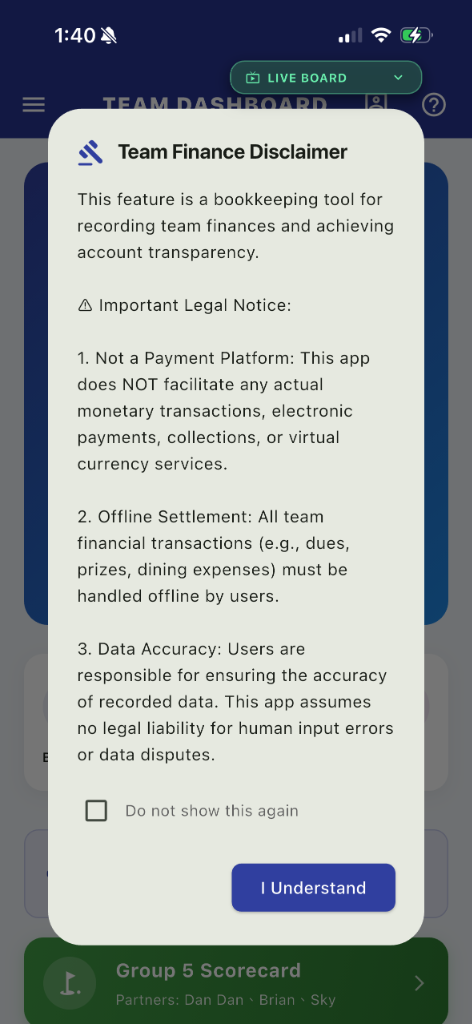
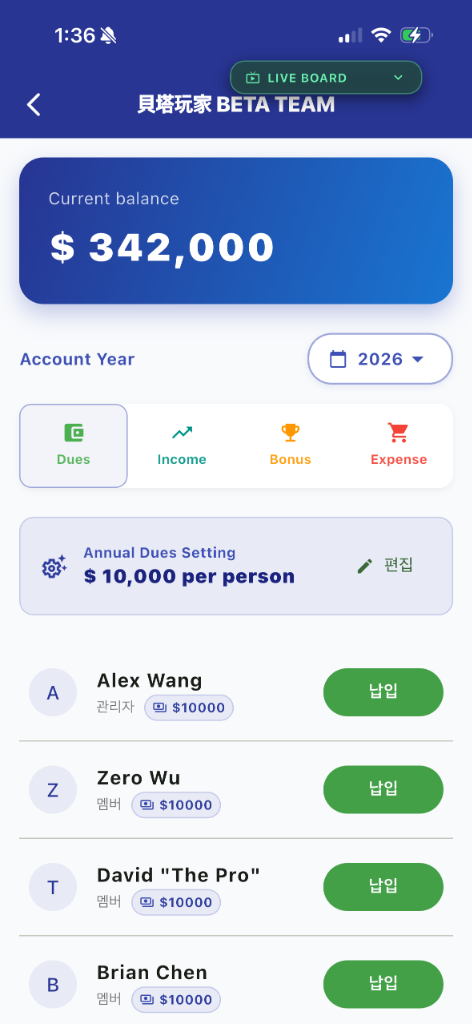
💡 Admins can long-press the balance for 3 seconds to manually correct the treasury total, making it easy to sync with historical records. Financial data is visible to admins only — regular members have no access.
📋 Four Main Categories
All ledger entries are strictly divided into four categories, each with its own dedicated management interface:
| Category | Type | Description |
|---|---|---|
| 💵 Dues | Income | Integrated with the member roster. Admins mark members as "Paid" in one tap; the system auto-generates the income record. |
| 📈 General Income | Income | Sponsorships, dining surplus, and other miscellaneous income. Custom titles and notes supported. |
| 🏆 Bonus Payout | Expense | Linked to the Tournament Module. Post-tournament awards (Net Champion, Near Pin, etc.) are automatically converted to expense records — no manual entry needed. |
| 🛒 General Expense | Expense | Dining costs, prize purchases, uniform orders, and other day-to-day expenses, recorded item by item. |
✨ Two Key Automations
💵 Dues Payment Tracking
A dedicated interface integrated with the member roster, showing each member's payment status at a glance. One tap marks them as paid, automatically linking to the correct annual dues amount — no spreadsheet cross-checking required.
🏆 Tournament Bonus Automation
Seamlessly linked to tournament finalization. Select a tournament, and the system pulls in all awards (including recipient names and amounts), converting them directly to expense records. No more double-entry for the Secretary General.
⛳ Tournament Lifecycle Management
This is the core digital feature of the team system, covering the entire loop from venue deployment to the awards ceremony:
1. Setup & Scoring Rules
Admins can select the course and specific tee-off sections (e.g., OUT/IN combinations) and set Scoring Methods. Supported rules include:
- Gross Score: A pure contest of skill.
- New New Peoria: Automatically calculates handicaps based on 12 hidden holes drawn by the system.
- New Peoria: A traditional handicap calculation method using 6 hidden holes.
2. Cloud Auto-Grouping (Group Management)
Say goodbye to manual pairing. The system provides "Automatic Random Grouping" for 2-4 players per group:
- Smart Sorting: Supports "Priority for Checked-in Players," ensuring late absences don't disrupt the group assignments.
- Intuitive Drag-and-Drop: Admins can manually fine-tune groups by dragging player avatars with their fingers.
3. Awards & "Ceremony Mode"
The system supports diverse awards: Ranking, Near Pin, Long Drive, etc. For handicap-based tournaments, the "Ceremony Mode" provides an extra layer of engagement:
✨ The Reveal Logic: During the awards dinner, admins can switch to Ceremony Mode. This temporarily freezes the leaderboard on members' phones. Results are only revealed on everyone's screens one by one as the admin "reveals" them on site, creating a perfect social surprise.
4. Random Hidden Hole Draw (Casino Mode)
For New New Peoria tournaments, admins can trigger a "Random Draw." The system spins like a slot machine to lock in the hidden holes for the day, ensuring fairness and adding a sense of ritual.
📝 Collaborative Scorecard Operations
Once the round starts, data from multiple groups is linked in real time. Using REN GOLF's exclusive Data Sync Locking Mechanism, the system handles cloud conflicts automatically when multiple people enter scores across different holes, ensuring no data is overwritten and everything is instantly visible on the "Live Board."